
.png)
Dubai, UAE · 2025-26 · Designer + Researcher
The system
wasn't missing.
It needed structure.
How I redesigned maintenance operations for UAE residential properties, not by replacing what teams already used, but by building structure around it.
Service Design . System Thinking . WhatsApp Integration . Field Research . Prototype Testing . Inventory Systems

User Demographics
Designing for the UAE:
Building around existing habits.
The UAE real estate market relies on one of the most diverse, transient workforces in the world. The challenge wasn't just software, it was human behavior.
Transient Workforce
Language Barriers
Technicians and tenants rarely share a native language. Basic English is the only common ground, leading to frequent miscommunication.
UX Constraints

Background
Before any system.
Just people and phones.
Short Story
A tenant’s AC stops working.
She messages the building group on WhatsApp. The manager notices it between other chats, calls a technician, and asks him to check when he’s free.
The required part may or may not be available. No one checks until the technician reaches the site. If it’s missing, more calls follow, and the tenant waits another day.
There is no ticket. No record. No update. No visibility into time, cost, or history.
This wasn’t one building. It was the pattern everywhere.

The operations were real. The teams were capable. What didn't exist was any structure underneath it, no shared visibility, no audit trail, no system that persisted beyond the last message in a chat thread.
- Electrical Maintenance Contractor, Sharjah, UAE
This was the starting point. Not a broken product. Just people managing complex, high-stakes operations entirely through calls and informal messages and absorbing all the friction that comes with that, every single day.
What the initial research revealed
Three people.
Three broken workflows.
I interviewed property managers, maintenance contractors, and technicians and talked to tenants about their experience on the other side. What I found wasn't a communication problem. It was a coordination problem.
Property Manager
Invisible work, visible blame
Fragmented Tracking: Maintenance, costs, and schedules scattered across WhatsApp, spreadsheets, and memory.
Manual Reporting: Weeks spent reconstructing annual data from chat histories due to lack of a central audit trail.
Technician
Can't act without permission
Information Bottlenecks: Every repair requires manual admin approval for stock and budgets, stripping technicians of autonomy.
Approval Delays: The wait for part authorization often exceeds the actual repair time, causing massive downtime.
Tenant / Resident
Silence is the worst update
Information Void: Tenants receive zero confirmation or status updates after submitting requests, creating high anxiety.
The "Uncertainty" Gap: Frustration stems from a lack of communication and ETAs, rather than the actual repair duration.
We already have two of those. Why did we order again?
Property Manager, Apartment in Al Barsha,UAE area
Contextual Enquiry - Observerd/Overheard during an inventory walkthrough.
'Inventory kept surfacing as a thread connecting every problem. Technicians would arrive at a job, discover a part was missing, request it, wait for admin approval, wait for the part.
Half the time, the part was already sitting in the storeroom. Nobody knew. Parts were getting ordered twice, or not at all.'

The WhatsApp Audit
I asked to see
the actual threads
The most revealing research I did wasn't interviews. It was sitting with a property manager and scrolling back through months of their WhatsApp history. What I found was an entire maintenance operation living inside a chat app.
Catergory: The Assignment Drift
While scanning this thread, I notice that task assignment is not explicit.
Multiple technicians acknowledge the issue, but ownership is never clearly established.

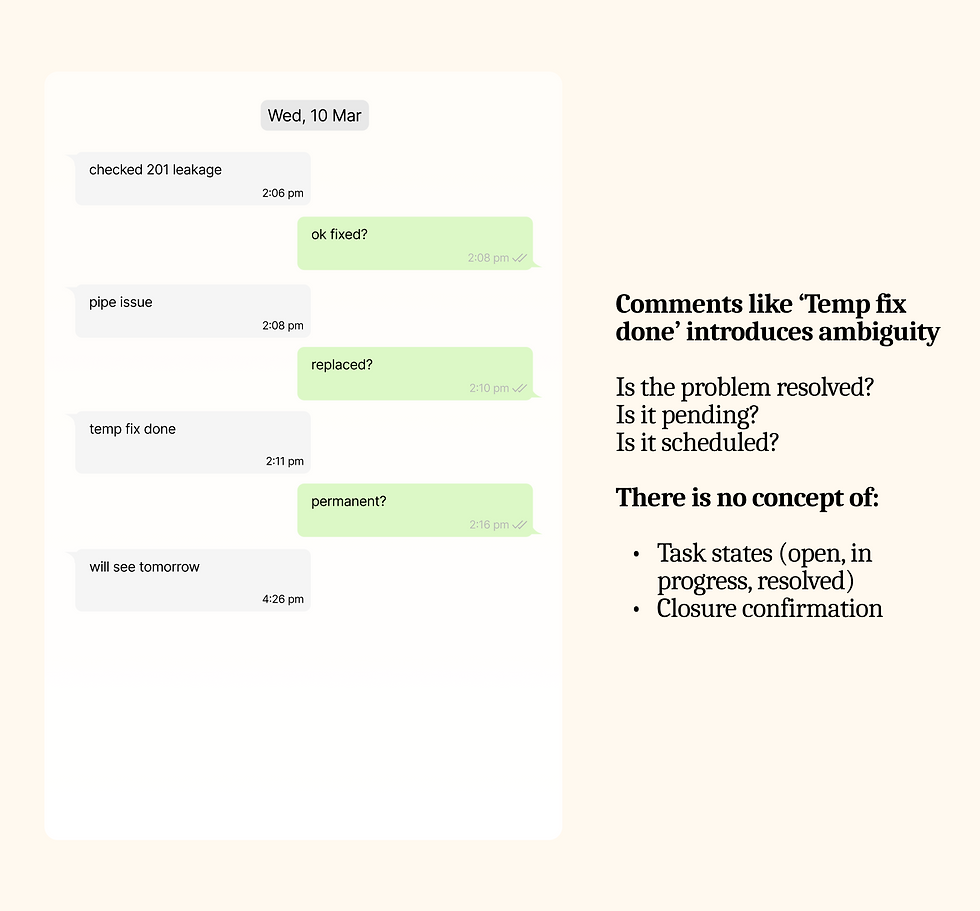
Category: The Invisible Progress
The issue here is not lack of communication, but lack of state definition.
The system allows partial updates without accountability, resulting in invisible task outcomes.
Catergory: Priority Collapse
When multiple issues compete in real time system fails as there is no prioritization framework. This leads to priority collapse, where urgent issues rely on ad-hoc coordination rather than system-driven escalation.

Catergory: Financial Tracking Breakdown
Financial data is being created, modified, and validated inside chat, with no structured system to support accuracy, traceability, or reporting. Errors propagate silently and surface late during audits.

Catergory: Multi-Thread Confusion
Multiple issues are handled in a single chat thread, causing messages to overlap and lose clarity. Conversations from different tasks get mixed, making it hard to follow any one issue.

Catergory: Knowledge Locked to One Person
Task continuity breaks when knowledge is tied to individuals instead of the system. Past actions, decisions, and fixes are not recorded in a reusable way. Inshort, 'Work resets when the same person is unavailable'.

Job assignments buried between good morning messages. Part requests mixed into group chats with no context. Status updates sent once, never confirmed. Annual expense summaries reconstructed from scroll-backs.
The operation was real and functioning, it just had no structure, no memory, no way to recover gracefully when anything deviated from plan.
30–40% Task Delay Due to Follow-ups
-
Tasks required multiple nudges to progress.
-
No clear ownership or status visibility.
-
Execution depended on reminders, not system flow
25–35% Rework Due to Missing Context
-
Lack of job history and resolution logs
-
Repeated clarification and re-diagnosis
-
Knowledge tied to individuals
Before State · Service Blueprint
The human bottleneck.
Mapped end-to-end.
Scenario: A broken water heater in Apartment B-302. Three personas. One overwhelmed dispatcher acting as the human API between all of them. What follows is exactly how this operation fails,step by step, gap by gap.
Only part of the thinking is captured here. Connect with me for the full story.

Ideation • Three Directions Explored
The first idea was
the obvious one.
Before arriving at the final direction, I explored three distinct approaches. Each addressed part of the problem. One addressed all of it without asking anyone to change how they worked.
Direction Rejected
Adopt an "All-in-One" Maintenance App
We tested a leading off-the-shelf mobile app with the field team. Management pushed for it, hoping the initial friction was just a one-time learning curve.
Why it failed ?
High technician turnover
In a region reliant on a rotating workforce of contractors, constantly retraining new staff on a rigid, unfamiliar app created massive operational debt.
'Task execution can't depend on an app workers resist using.'
Direction Partially Explored
3rd-Party Enterprise Helpdesk Software
We trialed heavy, off-the-shelf ticketing platforms. The goal was to centralize the chaos of incoming WhatsApp messages into a clean administrative dashboard.
Why it didn't hold ?
Forming a 'Human API'
It forced the dispatcher to become a "Human API", manually typing WhatsApp chats into ticketing fields, adding delay rather than efficiency.
Furthermore, the software was bloated, lacked vital local customizations, and came with aggressive vendor upselling.

The Pivot Point
The wrong question was"What should we build?"
Every early conversation around this project started the same way:
-
Build a maintenance app, maybe a full platform.
-
Give technicians a ticketing interface.
-
Give tenants something similar.
-
Hope the data quality improves based on how well people use it.
But once we got into the field, that assumption didn’t hold up.Technicians weren’t struggling with tools.They were already using one, really well.
WhatsApp: It had near 100 percent adoption.
Always open, always accessible, used in the middle of jobs, in real situations.The issue wasn’t the tool, It was everything around it that lacked structure.
Turning Messages into Action
A system where requests don’t pause or disappear they move forward with defined ownership and visibility.
System design
Beyond the Screens: Designing the unseen logic.
UX was not limited to the interface or information architecture of the web app. It extended to defining how the system works behind the scenes.
Understanding these layers helped me design not just the visible experience, but also the logic that powers it, ensuring the system behaves consistently across both communication and operations.
Tenant Experience
-
Tenants report issues and track statuses purely through standard WhatsApp.
-
Zero apps to download.
-
The system translates complex internal operations (like part procurement delays) into empathetic, automated natural-language summaries, ensuring absolute transparency.
Automated
Admin Dashboard
-
A dual-context web app powered by n8n & MySQL, cleanly separating external support from internal coordination.
-
AI analyzes incoming messages for sentiment, suggests departments, and ranks the best available technicians for 1-click dispatching.
Web App
Technician Field Execution
-
Technicians receive rich task summaries directly in WhatsApp.
-
Instead of messy free-text, they use interactive WA buttons to accept jobs. Ignored tasks automatically escalate back to the dispatcher if SLA thresholds are breached.
Inventory & Asset Intelligence
-
An interactive WA bot lets techs query the live SQL database on-site.
-
In-stock parts are auto-reserved; out-of-stock items push structured procurement requests to the admin's sidebar for one-click approval, linked directly to the asset's lifecycle history.
Integrated

Workflow Logic: Tenant-to-Admin Intake
The flow illustrates the system’s front-door architecture, converting a simple tenant message into a prioritized and monitored workflow.
This is one of several core logic paths within a larger ecosystem not fully showcased here, lets connect to discuss in detail!

The Orchestration layer
Designing the Dispatcher’s
Command Center - FixPro

01
Operational Workflows: Mapping the Service Logic
Fitting real world flows to digital flows
To transform a simple messaging tool into an enterprise-grade Dispatch Engine, I mapped five primary service flows. Each flow is designed to minimize "Time-to-Resolution" while maintaining strict security and financial guardrails.
The "Digital-First" Dispatch (Automated Triage)
Scenario: A tenant sends a new complaint via WhatsApp.
-
The Triage: The Dispatcher identifies the issue via the dashboard and selects a technician.
-
The Handshake: Once the Dispatcher clicks [Accept] on WhatsApp, the system automatically shares the Tech’s vCard and a Security OTP with the tenant.
-
The Check-In: The Technician must input the Tenant’s OTP to officially start the labor timer, ensuring physical presence and site security.
The "First-Time Fix" (Known Solution)
Scenario: A walk-in or phone complaint where the fix is already known.
-
Manual Intake: The Dispatcher creates a job manually, bypassing the diagnostic phase.
-
Pre-emptive Allocation: Using a Multi-Model Dropdown, the Dispatcher attaches the specific hardware to the task.
-
The Kit-Up: The Technician is notified to "Kit Up" and pick up the specific part from the warehouse before heading to the site, achieving a 100% First-Time Fix rate.
The "Manual Entry" (Omnichannel Intake)
Scenario: A tenant calls the landline or walks into the management office.
-
Direct Intake: The Dispatcher opens a new "Manual Job" form. They search for the tenant’s profile, which auto-populates unit and contact details.
-
Live Creation: The Dispatcher logs the issue details while on the call.
-
The Digital Sync:The system fires an automated WhatsApp message to the tenant: "We've logged your request. Your technician will be assigned shortly." This brings the offline request back into the standard digital tracking loop.
The "Field-Diagnostic" (Uncertain Resolution)
Scenario: A complex issue where the solution is unknown until a professional inspection is performed.
-
The Inspection: The Tech arrives, checks in with the OTP, and performs a manual diagnosis.
-
Live Inventory Query: The Tech selects [Replace] in WhatsApp and types the part name. The system queries the database in real-time.
-
The SLA Pivot: In Stock: Part reserved instantly; Tenant notified of a 24-hour fix. Out of Stock: Procurement triggered; Tenant notified of a 7-10 day lead time.
The "Resiliency Layer" (Exception & Fail-Safe)
Scenario: Non-responsiveness in the field or human oversight that threatens the service level.
-
Tier 1 (Alert): If a Tech doesn't accept a task in 15 mins, the Dispatcher gets a "High-Priority" dashboard alert.
-
Tier 2 (Auto-Escalate): If the Dispatcher is idle, the system Auto-Assigns the next available technician in the same department.
-
Tier 3 (The Red Phone): If all digital triggers fail, the system initiates an Automated Voice Call (the most expensive fallback) to the lead supervisor. This ensures that even in total digital silence, the physical emergency is addressed.
02
Pixels, Purpose, and Putting It Together
UI/UX: Execution & Rationale
A broken AC at midnight isn't just a task; it's a crisis. Here’s the story of how our UI turns real-world panic into a seamless, structured workflow,from the tenant's first frantic message to the technician's final fix.

Dispatcher Interface
Four-Layer Design
The dispatcher screen is the operational heart of FixPro. Every design decision in it was made to reduce cognitive load and surface the right information at the right moment.

-
Clear Workflow Split: The toggle isolates tenant chats from internal work orders.
-
State-Driven Filtering: Resolution states filter the active chats to drive prompt action.
Messages and Filters

-
Every tenant message is analysed for urgency and emotional tone.
-
"Distressed / Urgent" is detected from language, not just keywords.
-
Auto-tags (#HVAC, #No Cooling) and a dispatch recommendation are generated before the dispatcher reads the message.
Sentiment & Auto-Triage

-
Inline Procurement: Dispatchers approve parts or suggest alternatives directly on the request card.
-
Automated Status: Technician progress updates automatically to eliminate manual data entry.
-
Live Financials: Cost totals calculate instantly as parts are allocated for full transparency.
Parts, Progress, & Price Tags

-
Every maintenance request triggers automated, template-based updates.
-
Updates can include structured information like contact cards, images, and status details.
-
Example: when a technician is assigned, a message is automatically sent with technician details and contact information
No More “What’s Happening?” Moments
03
From Screens to
Real-World Workflows
Designing for how maintenance actually happens across requests, assignments, and inventory
The focus shifts from individual screens to how the system works end-to-end in real scenarios. This section brings together the key task flows, from ideal interactions to real-world edge cases, along with supporting processes like inventory search and allocation.
Multi-User Flows
Intelligent Dispatch
Right Tech, Right Job
Assigning a technician used to be a memory game. FixPro makes it a one-click decision surfacing the best match based on skills, availability, and distance directly inside the ticket.


The Happy Flow
Once the request is raised, both tenant and technician are aligned from the start. The technician receives clear task details, knows exactly where to go, and what to do next without needing extra calls or clarification.
Each step is guided through simple messages and actions, making the process easy to follow even in fast-paced, on-ground situations. This reduces confusion and helps technicians focus on completing the work rather than figuring out the process.
“I know the issue, the location, and what to do next. It’s very clear.”
Technician after reviewing the prototype

The Edge Cases
While the ideal flow ensures a smooth experience, real-world operations often involve delays, missed responses, and dependency on multiple people. This system is designed to handle these situations proactively through automation, escalation, and continuous communication.
Human actions don’t always follow predictable patterns
-
Delayed or no response
-
Admin or technician does not respond within expected time
-
-
Shared ownership of tasks
-
Work shifts between people instead of a single owner
-
-
Availability constraints
-
Assigned technician is busy or unavailable
-
-
Inventory uncertainty
-
Required parts are not available or not updated in the system
-
-
Communication gaps
-
Messages are missed or lost in chat-based workflows
-
Edge cases were anticipated and designed to be handled progressively through testing and continuous refinement.
Inventory, Simplified to a Conversation
The inventory experience is reimagined as a simple conversation. Technicians can request items using everyday language, without navigating complex interfaces or remembering system rules.
-
Converts inventory search into natural language input
-
Eliminates dependency on technical knowledge or system navigation
-
Supports quick actions like repair or replacement with guided choices

Prototype testing
Testing was mixed,
Here's what broke.
Tested the prototype with property managers and maintenance contractors to validate task flows. Some worked as expected, while others highlighted gaps that led to design improvements and uncovered a core assumption.

When Work Doesn’t Follow a Straight Line
The focus shifted from linear flows to a recurring pattern of shared ownership. Research had already highlighted frequent handoffs, and testing reinforced how central this pattern is to real-world operations, making it important to design for it more explicitly.
-
Work moves across people based on availability and context, not in a strict sequence
-
Ownership is dynamic and shared, shifting between roles as the task progresses
Reflection
Nailed It:Or So I Thought
What this project clarified, challenged, and changed
This project was born from watching a maintenance contractor struggle with chaotic tax audits. The core issue isn't ignorance; most businesses are already problem aware and solution aware. The real barrier is the friction of implementation.
The project started by understanding the same journey from different roles:
-
Tenant raising a request.
-
Admin coordinating.
-
Technician executing.
Clarity only came when these perspectives were mapped together as one system.
What Clicked?
Structure beats features
Once communication was structured, most operational issues resolved naturally
Clarity reduces anxiety
Acknowledgments and visibility mattered as much as resolution

Familiarity drives adoption
Building on WhatsApp removed friction from day one
Closed loops build trust
Ensuring every request had a clear acknowledgment, action, and closure removed uncertainty across all roles
Where It Broke?
Edge cases came late
Reassignments, delays, and drop-offs exposed gaps in early thinking
Tone was underestimated
Functional replies often escalated situations instead of resolving them
Mapped end to end scenarios directly in n8n to ensure requests, delays, escalations, and closures behave reliably in real conditions
Defined the system through workflows
Fix 1
Translated assumptions into trigger-based workflows.
Response SLAs, auto-acknowledgments, escalations, and assignment loops were defined and validated through n8n
Made logic visible and testable
Fix 2
Ensured every action updates the system for everyone
tenant, admin, and technician always see a consistent and current state
Aligned roles through a single loop
Fix 3
What I’d Do Differently?
Edge Cases as the Baseline
Breakdowns are recurring patterns, not exceptions they should shape the system, not sit outside it
Action Points
-
Track frequency and types of breakdown scenarios
-
Promote high-frequency edge cases into core flows
-
Design recovery paths that maintain continuity without manual fixes
Learn from Repetition
Repeated issues indicate system-level signals, not isolated problems
Action Points
-
Identify recurring complaints at asset or category level
-
Use patterns to improve routing, assignment, and planning
-
Surface insights that help prevent issues, not just resolve them
Balance Workload Across the System
Efficiency drops when work distribution is uneven or reactive
Action Points
-
Monitor technician load and response patterns over time
-
Introduce smarter assignment based on availability and past performance
-
Reduce bottlenecks caused by over-reliance on specific individuals

When communication is clear, the system feels in control.
When it isn’t, everything feels broken.
This project was about fixing that layer first.
Thank you for reading
View More Work


CAD Workflows: Designing for Recovery
